


RICOH GR IV HDFProducts Information
Below is a list of frequently asked questions and corresponding answers for the GRIV HDF digital cameras.
General function and specification
 What to do first?
Please follow the steps below:
- Check the included items according to the enclosed Start Guide.
- Refer to the Start Guide to review the precautions for use, then insert the rechargeable battery (DB-120) and a commercially available microSD memory card.
* Even without a microSD card, you can still record images using the camera’s built-in memory (approx. 53 GB).
- Charge the lithium-ion battery (DB-120) following the instructions in the Start Guide.
- Turn on the power and complete the initial setup when starting the camera for the first time.
- If you insert a commercially available microSD memory card, make sure to format it with the GR IV HDF before shooting.
- Perform a test shot by pressing the shutter button and confirm that the image is recorded correctly.
- Access the GR IV HDF User Guide, which provides more detailed information, via the QR code or URL on the cover of the Start Guide.
- Follow the instructions in the Start Guide or the User Guide to complete the settings, and enjoy shooting with your GR IV HDF.-
What accessories are provided with this camera?
The following accessories are providing with this camera.
・Strap O-ST198
・USB cable I-USB198
・Rechargeable lithium-ion battery DB-120
・Hot Shoe Cover (attached to camera) O-HC198
・Ring Cap: GN-3 (BK) (attached to camera)
・Start guide-
What are the optional accessories for this camera?
The optional accessories are as follows:
■Battery
・Rechargeable Lithium-ion Battery DB-120
・Battery Charger BJ-12
■AC Adapter
・AC Adapter Kit K-AC166J (AC Adapter + AC Cable)
・AC Adapter D-AC166 (AC Adapter only)
■External Viewfinder
・External Viewfinder GV-1
・External Mini Viewfinder GV-2
■External Flash
・External Flash GF-2
■Conversion Lens
・Wide Conversion Lens GW-4
・Lens Adapter GA-3
■Case
・Soft Case GC-12
・Soft Case GC-11
■Metal Hotshoe Cover
・GK-2
■Strup
・Neck Strap GS-3
・Neck Strap ST-2
・Hand Strap GS-2
・Finger Strap GS-4
■USB Cable
・USB Cable I-USB198
■Ring Cap
・GN-3 (BK)
*For more information, please click here.-
What else to do need besides the included items when purchasing?
The GR IV HDF has approximately 53 GB of built-in memory.
If you want to store more images, please prepare a memory card with a capacity suitable for the number of images you plan to shoot.-
What are the main differences between GR IV HDF and GR IV?
The GR IV HDF is equipped with a Highlight Diffusion Filter instead of the ND filter found in the GR IV.
Note: ‘HDF’ stands for Highlight Diffusion Filter.
It is a specially processed filter that utilizes RICOH’s long-standing printing technology to deliver unique effects.
By default, the rear Fn button switches between normal shooting mode and HDF shooting mode. In addition, the camera is equipped with a new electronic shutter. Shutter speeds of up to 1/16,000 seconds can be set.
The screen displayed when the power is turned off will be exclusive to the HDF model.
Power supply / Battery
* For items not listed below, please refer to the GRIV FAQ
-
What type of battery can be used?
The camera uses the rechargeable battery DB-120.
* The DB-110 used in the GR III series, as well as the DB-65 used in the GR / GR II / GR DIGITAL series, cannot be used.
Memory Card
* For items not listed below, please refer to the GRIV FAQ
-
What type of memory card can be used?
The camera uses microSD cards in size and shape.
It supports microSD, microSDHC, and microSDXC memory cards.
microSDHC and microSDXC cards are compatible with the UHS-I standard.
The maximum transfer speed of the UHS-I standard is 104 MB/s.
■The following memory cards have been tested for compatibility:
• KIOXIA (Toshiba) and SanDisk
o microSDHC memory cards: up to 32 GB
o microSDXC memory cards: up to 1 TB
*For video recording, it is recommended to use a high-speed memory card with a speed class of Class 6 or higher.
*The camera has approximately 53 GB of built-in memory.
As of January 2026
“Tested for compatibility” means that the camera has been tested by the manufacturer for operational confirmation to assist customers. This does not constitute a guarantee to the customer.-
Is there anything that should be done before using a microSD memory card?
For a new memory card, or one that has been used in a computer or other device, any data on the card should be saved to a PC or other storage device first.
Then, format the card using the camera before use.
Note: Formatting will erase all data on the card, so take care.-
Does the camera support the UHS speed class?
Yes, it is compatible with the UHS-I standard for microSDHC and microSDXC memory cards.
The maximum transfer speed of the UHS-I standard is 104 MB/s.
Shooting Function
* For items not listed below, please refer to the GRIV FAQ
-
What does ‘HDF’ stand for?
'HDF' stands for Highlight Diffusion Filter.
It is a specially processed filter that utilizes RICOH's long-standing printing technology to deliver unique effects.-
What are the effects and characteristics of HDF?
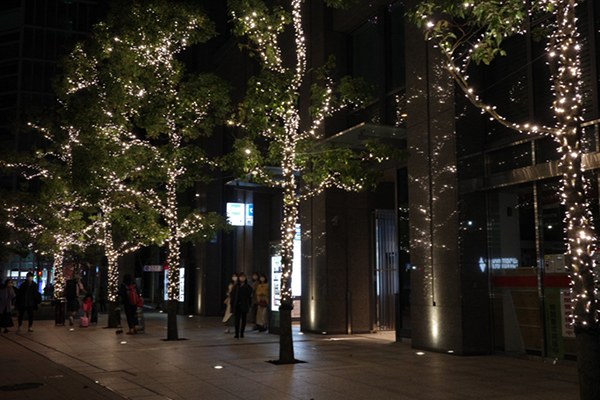
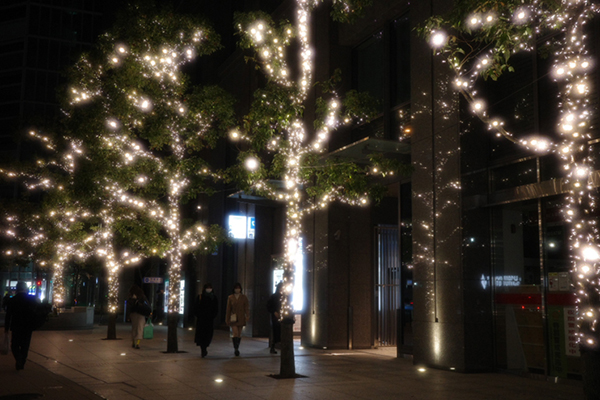
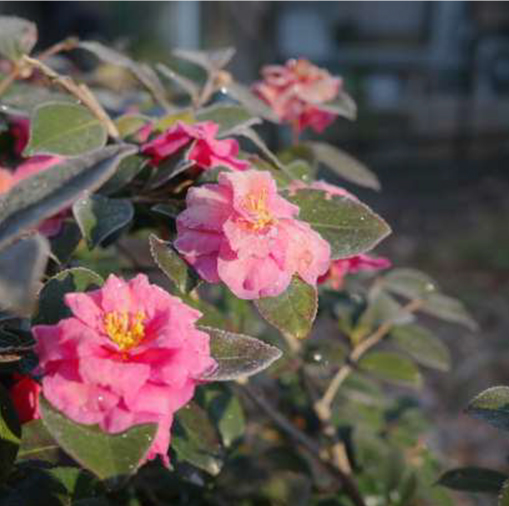
It softly diffuses light in bright areas, producing a gentle glow around highlights. This effect emphasizes light while creating a soft, film-like and cinematic look.

-
When a point light source is strongly out of focus, faint patterns may appear in the blurred image. What causes these patterns?
In close-up shooting, such as macro photography, background point light sources may appear as large, circular blurred highlights. In such cases, the printed pattern of the HDF may sometimes be visible within the blurred circles.

-
Why is there no “ND Filter” option in the exposure settings of the still image settings menu?
The HDF (Highlight Diffusion Filter) is installed in the same mechanism that houses the ND filter on the GR IV. For this reason, the menu displays an [HDF] option instead of [ND Filter]. The HDF setting is supported by the menu’s mode memory, so the [HDF] setting can be retained the next time the camera is turned on. When HDF is turned on, an icon is displayed on the shooting mode screen. * In shooting conditions with strong light or very bright subjects, using the aperture wide open may result in overexposure. In such cases, we recommend stopping down the aperture to an appropriate f-number when shooting.-
Is flash photography available?
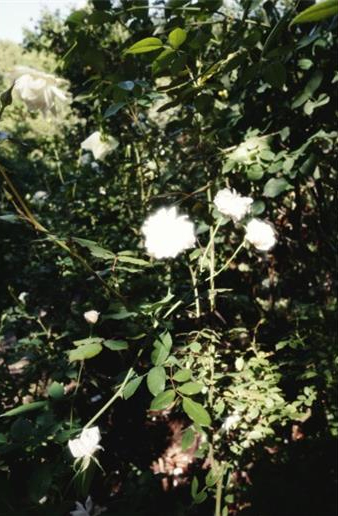
Yes. Flash photography is possible by connecting the optional external flash “GF-2.”
When shooting outdoors during the daytime using flash with the GF-2, turning HDF on may produce a more noticeable HDF effect, depending on the shooting distance and conditions.
* Since the GF-2 has a guide number of 3 (ISO 100), the effect of HDF may be less noticeable when shooting at longer distances.
-
What is the newly introduced electronic shutter?
The camera is equipped with an electronic shutter that allows the selection of faster shutter speeds. This makes it possible to shoot at shutter speeds of up to 1/16000 second while keeping the aperture fully open at F2.8.
*When the aperture is fully open at F2.8, the maximum shutter speed of the mechanical lens shutter is 1/2500 second.
This expands the range of exposure combinations, making it possible to achieve proper exposure even in very bright environments, such as a midsummer beach, by using the high-speed electronic shutter while keeping the aperture wide open. In addition, as mentioned above, HDF can also be used in the same environments, which expands the range of shooting situations where the HDF effect can be utilized.-
At what shutter speed does the camera switch between the electronic shutter and the lens shutter?
When the aperture is set between F2.8 and F4.0, the lens shutter can be used at shutter speeds of 1/2500 second or slower, while the electronic shutter is used at shutter speeds from 1/3200 to 1/16000 second.
When the aperture is set between F4.5 and F5.0, the lens shutter can be used at shutter speeds of 1/3200 second or slower, while the electronic shutter is used at shutter speeds from 1/4000 to 1/16000 second.
When the aperture is set between F5.6 and F16, the lens shutter can be used at shutter speeds of 1/4000 second or slower, while the electronic shutter is used at shutter speeds from 1/5000 to 1/16000 second.-
What should I be aware of when using the electronic shutter?
When using the electronic shutter, fast-moving subjects such as trains, cars, or sports scenes may appear slanted or distorted in a curved shape in the image.
*Flash (GF-2) cannot be used in combination with this.
*Shake Reduction and the low-pass filter selector will be disabled.
-
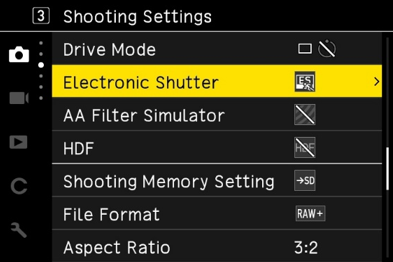
Can the electronic shutter be turned on and off?
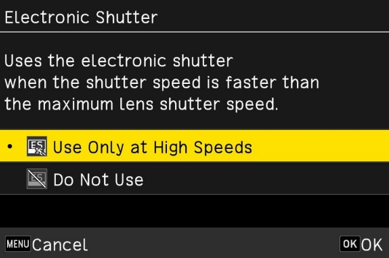
From the [Electronic Shutter] menu item, you can select either “Use only at high speeds” or “Do not use.”