




PENTAX 17Products Information
Below is a list of frequently asked questions and corresponding answers for the PENTAX 17 film camera.
General function and specification
 What accessories are provided with this camera?
The following accessories are providing with this camera.
・3V lithium-ion battery CR2
・Strap O-ST191
・Lens cap O-LC40.5
・Quick guide
・Warranty certificate
* Film not included.-
What are the optional accessories for this camera?
The optional accessories are as follows:
・Cable switch CS-205.-
Is film included?
No, film must be purchased separately.
・35mm film.
・Films with ISO sensitivity of 50/100/125/160/200/400/800/1600/3200
・Film capable of taking up to 36 exposures (72 exposure half format)
* Infrared film is not compatible.-
Which batteries are compatible?
CR2 3V lithium-ion battery.
* Rechargeable Battery is not compatible.-
Does the camera have a zoom lens?
No, the lens is a HD PENTAX single focal lens 25mm (37mm equivalent)-
Is the lens interchangeable?
No, the lens is fixed.-
Does the camera have automatic film winding?
No, film winding and unwinding is manual.-
Does the camera have auto focus?
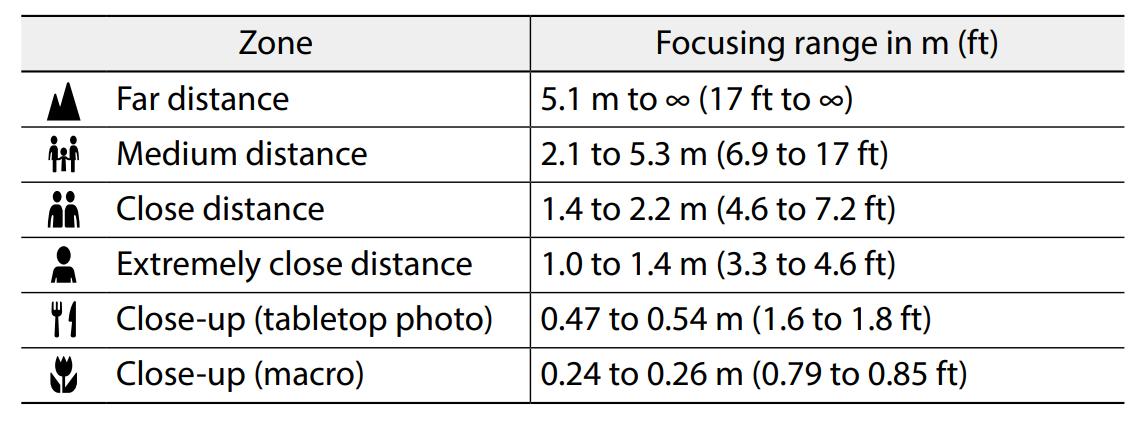
Camera uses zone focus. Select a zone depending on the distance to the subject. The focusing range of each zone is as follows.
-
Does this camera have shake-reduction?
No, this camera does not have shake-reduction.
When taking pictures, please hold the camera with both hands to avoid camera shake and gently press the shutter release button.-
Is this camera have a flash?
Yes, coverage angle of view equivalent with a 25mm lens.
The range that the flash reaches depends on the ISO sensitivity of the film used. As a rough guide, the flash can reach up to the “close distance” zone when using film of ISO 100 and up to the “medium distance” zone when using film of ISO 400 or higher.-
Can the camera be attached to a tripod?
Yes. Be careful not to overtighten the screw in the tripod socket when attaching the camera.-
Can the camera be operated by remote control?
No. this camera cannot use remote control.
Cable switch (CS-205) is an optional accessory-
Does the camera have a self-timer?
No.-
Can the camera use multiple exposure?
No.-
Can filters be attached?
Yes. The camera is compatible with commercially available 40.5mm filters, which can be attached to the lens filter mounting thread.
- Using a colored filter or filter with density can make it impossible to obtain the correct exposure. Make sure to take some test shots in advance and use exposure compensation.
- If an exposure multiplying factor, etc., is required for a colored filter used with black and white film, compensation may not be possible in combination with the metering sensor. Make sure to take some test shots in advance.
- Using multiple filters may cause vignetting in the metering range, making it impossible to obtain the correct exposure. Make sure to use only one filter with a thin edge.
-
Can external flash be attached?
No.-
Does the camera have exposure compensation?
Yes. Turn the exposure compensation dial to the desired setting. Compensation is available in a range of ±2.0 EV in 1/3 EV steps.-
What is [BOKEH] of mode dial?
This mode gives priority to the widest aperture possible. This mode allows you to take pictures that make the most of the “BOKEH” effect.-
Can the shutter sound volume be changed?
No. This camera cannot change shutter sound.-
Is the camera water/weather resistant?
No. please handle carefully in rain or conditions where camera can be exposed to moisture.-
What are the recommended operating conditions?
Temperature: 0 to 40°C (32 to 104°F). Humidity: 85% or less (the environment must be free of condensation.)
Sudden temperature changes will cause condensation on the inside and outside of the camera. Place the camera in your bag or a plastic bag and remove it after temperatures of the camera and surroundings are equalized.-
Does the camera have diopter adjustment?
No.-
What are the lights next to the viewfinder?
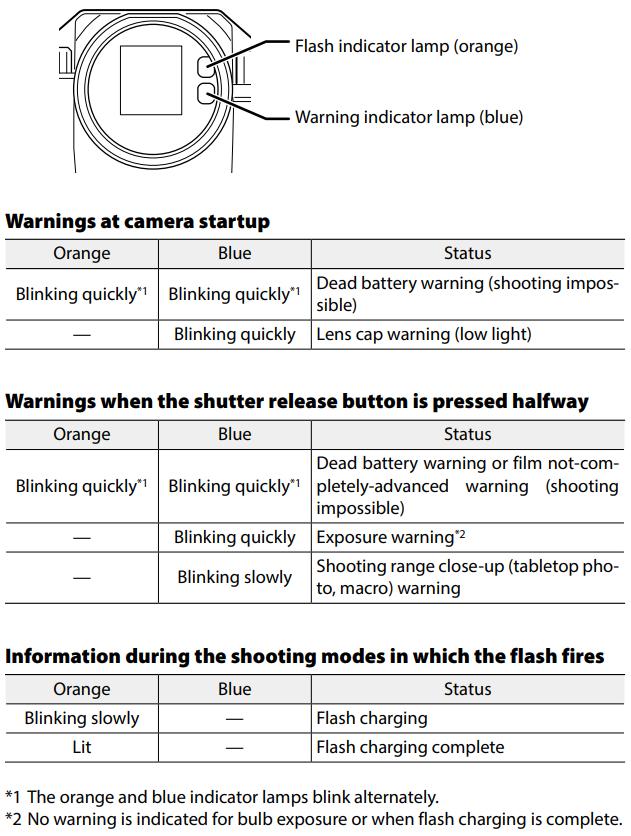
The two colored lamps next to the viewfinder indicate the camera status and warnings
-
What are the lines seen when looking through the viewfinder?
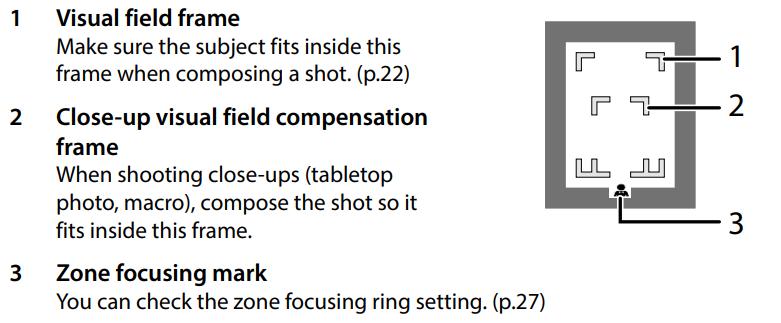
This is a rough guide to frame the subject to be captured.
-
Can the date be printed on the picture?
No. This camera has no date setting.-
Is the film sensitivity set automatically?
No. the film sensitivity must be set each time new film is loaded.-
Can the camera store digital picture data?
No.-
Can the camera transfer images to a smartphone?
No.-
Is the camera compatible with SD card and Micro SD card?
No. This camera uses only film.-
Can the camera take pictures without film?
No.
Troubleshooting
-
I opened the back cover of the camera with film in it.
Opening the back cover with the film still in the camera will expose the film to ambient light, which may erase or discolor the captured image. Close the back cover immediately.
It is not recommended to continue shooting with photosensitized film.
The captured image in the cartridge may not be photosensitized, so rewind the film and consult a camera store.-
Cannot turn on the power.
Please make sure as followings. If the problem persists, please request a repair.
1.No battery.
Please insert battery.
2.The battery is inserted in the wrong orientation.
Correct the orientation of the battery.
3.Empty battery.
Replace battery.
4.Wrong type of battery.
Use a commercially available 3V lithium CR2 battery.-
The camera suddenly shuts down.
Please confirm the following. Should the problem persist, please request a repair.
1.[Auto Power Off] was activated due to a long period of inactivity.
Press the shutter release button halfway.
2.Empty battery.
Insert new battery.-
Unable to wind film.
Please confirm the following. Should the problem persist, please request a repair.
1.The film is already wound up.
Please release the shutter.
2.The film has been taken to the end of the film.
Rewind and remove the film.
*Do not wind up more than the specified number of film frames x 2.
(Example. Do not wind more than 48 shot of a 24-exposure film.) The film may tear or break.-
Film cannot be rewound.
Please confirm the following. Should the problem persist, please request a repair.
1.The rewind button on the bottom of the unit is not pressed in.
Push in the rewind button, then press the rewind crank and turn it clockwise.-
Shutter does not fire.
Please confirm the following. Should the problem persist, please request a repair.
1.Battery empty.
Please insert new battery.
2.Does not turn on the power.
Please turn on the power.
3.Wrong type of battery.
Use a commercially available 3V lithium CR2 battery.
4.Half release shutter button.
Press the shutter button.-
Cannot remove the film cartridge from the camera.
Do not open the back cover of the camera before requesting repair. If the back cover is opened before the film is fully rewound, the film will be photosensitized, and the contents of the shot will be lost.-
Does not in focus.
Please confirm the following. Should the problem persist, please request a repair.
Lens is dirty.
Wipe clean with a soft, dry cloth.
1.The shooting distance setting is not correct.
Use the zone focus ring to select the zone you wish to focus on.
2.Too close to the subject.
Use by Macro mode or move away from subject.
Note:This camera has not autofocus system.-
The image seen through the viewfinder is out of alignment with the image taken.
Please be careful as following.
・Look through the center of the viewfinder.
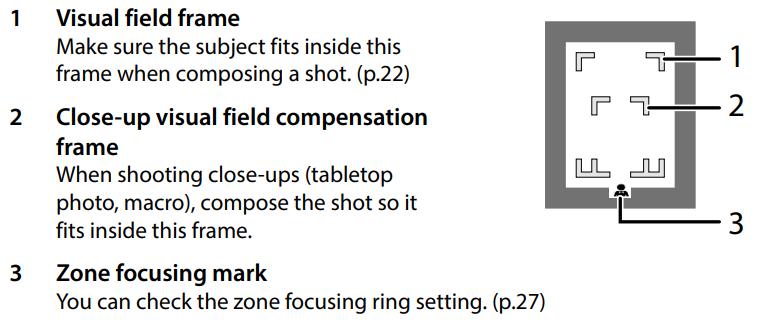
・The subject should be placed within the viewfinder's field of view.
・When shooting in close-up (table photo/macro), place the subject within the close-field-of-view correction frame.
-
Flash does not fire.
Please confirm the following. Should the problem persist, please request a repair.
1.The flash was not charged.
Make sure the flash indicator lamp (orange) is lit before shooting.
The shooting mode was set to no flash mode.
Shoot in one of the following shooting modes: Full Auto, Daytime Synchro, or Slow Synchro.
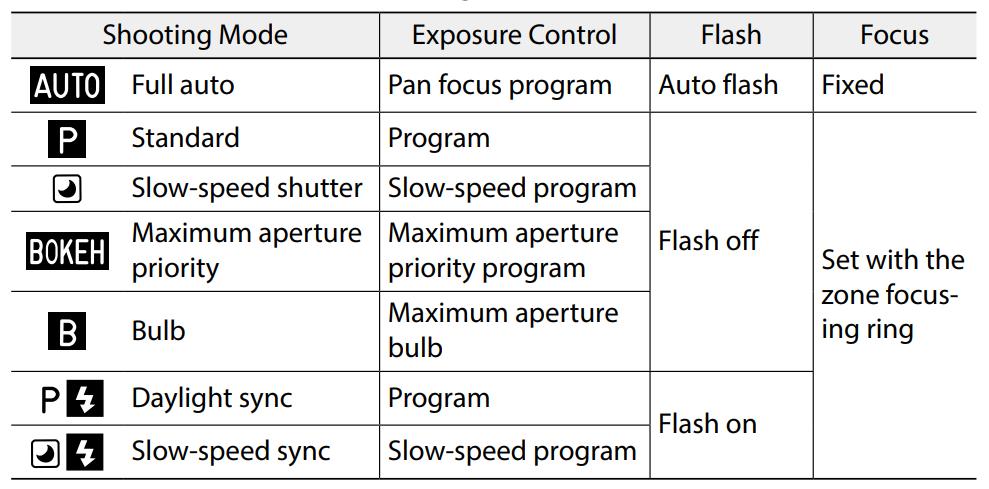
-
Even though used flash, the photo is under exposed.
Please confirm the following. Should the problem persist, please request a repair.
1.The distance to the main subject is too far.
The range of the flash depends on the ISO sensitivity of the film used. As a rough guide, the flash can reach up to the “close distance” zone (1.4-2.2m)
when using film of ISO 100 and up to the “medium distance” zone (2.1-5.3m) when using film of ISO 400 or higher.
2.Background is dark.
When taking photos of a person against a dark background, the flash is fired at the person and the background is exposed using the slow speed shutter.-
The photo is dark and not visible.
Please confirm the following. Should the problem persist, please request a repair.
1.If the lens cap is attached, the image will not be captured.
Remove the lens cap before taking the picture.
2.The surroundings were too dark and below the exposure range (EV2.5-16.5 (ISO100)).
Try taking the picture in a brighter place.
3.Flash does not fire.
Please make sure the flash indicator lamp (orange) is lit before taking a picture.
4.The flash was covered with your hand.
Do not cover the flash.-
The rewind button is stiff.
Due to the structure of the camera, the rewind button may be difficult to press, but this is not a malfunction. Hold the camera firmly and press it firmly using the pad of your finger.